


KBC Networks · Remote power planning
Solar and battery estimator
Choose your solar zone, add the equipment you need to power, then set battery backup. Your estimate updates as you go.
01
Solar zone
Start with the zone for your installation site.
Choose your zone using the regional maps below. Zone 1 has the highest availability in KBC’s guide.
Find my zone on a map
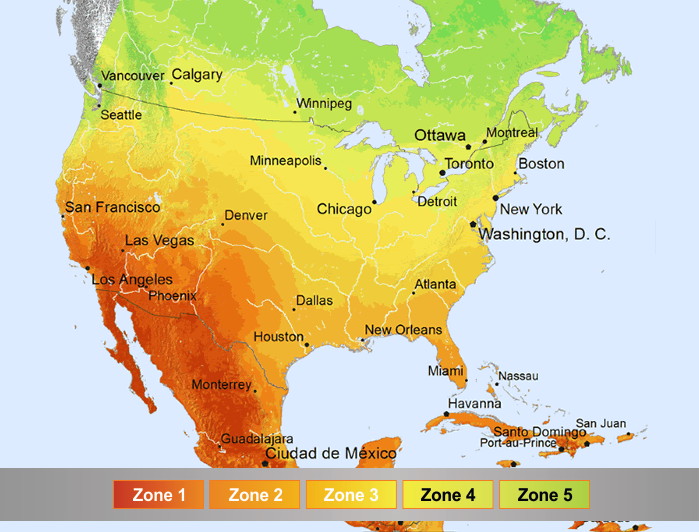
These are broad planning zones. Confirm local conditions before specifying a system.
02
Products and power
Select KBC equipment or enter the total power you expect to use.
Total continuous power—
03
Battery backup
How long must the equipment run without useful solar generation?
04
Your estimate
Indicative solar array and battery sizing.
Select a solar zone and enter your load to see an estimate.
Suggested solar panel array—
Continuous load—
Daily equipment energy—
Backup energy required—
—
Please select which battery type you would like to use. The selected option will be highlighted and included in the Bill of Materials and PDF.
Bill of MaterialsRecommended KBC items based on the information entered.
| Type | Model / item | Qty | Notes |
|---|
About this estimate
Panel sizing follows the load thresholds configured for the selected KBC solar zone. The selected panel is the smallest configured array that supports the continuous load in that zone. Battery sizing compares load × requested backup hours with each bank’s configured usable amp-hours × system voltage. It does not calculate winter autonomy, recharge time or guaranteed solar output. Shading, mounting angle, local weather, battery ageing, temperature, wiring and enclosure fit need a site design review.
